
TL;DR
Smart home kitchen gadgets connect appliances and tools to apps, voice assistants, or other devices to provide alerts, automation, and monitoring. Start with one device that solves a regular annoyance—such as a cooking thermometer or leak sensor—and check its compatibility, offline behavior, privacy support, and safety instructions before you buy.
Your oven can send a phone alert when it reaches temperature, but that ping cannot tell you whether the Wi-Fi will hold or whether dinner is safely cooked. That gap is the real story behind smart home kitchen gadgets: they can make routine jobs easier, yet the useful details hide in compatibility, reliability, and safe use.

Get kitchen gear delivered free with Prime
- Fast, free delivery on millions of items
- Prime Video, Amazon Music and more included
- Member-only deals all year
These devices range from connected thermometers and leak sensors to refrigerators and ovens with apps. You’ll see what the gadgets actually do, which smaller upgrades can earn their shelf space, and what to check before spending extra on a smart feature. A good setup should feel like a helpful kitchen timer, not another appliance demanding your attention.
Think of a connected kitchen as a set of instruments around the stove. One can watch temperature, another can spot a drip under the sink, and a speaker can announce a timer over the hiss of boiling pasta. Each instrument helps with a specific task; none replaces your judgment or the manufacturer’s safety instructions.
Choose a gadget to fix a frequent task, such as monitoring a roast or spotting a leak.
Check compatibility for the exact model and feature you plan to use.
Find out which controls and displays still work during an internet outage.
Use smart plugs only for appliances and power levels approved by both manufacturers.
Review privacy, update, repair, and subscription details before buying.
What smart kitchen gadgets can actually do for you
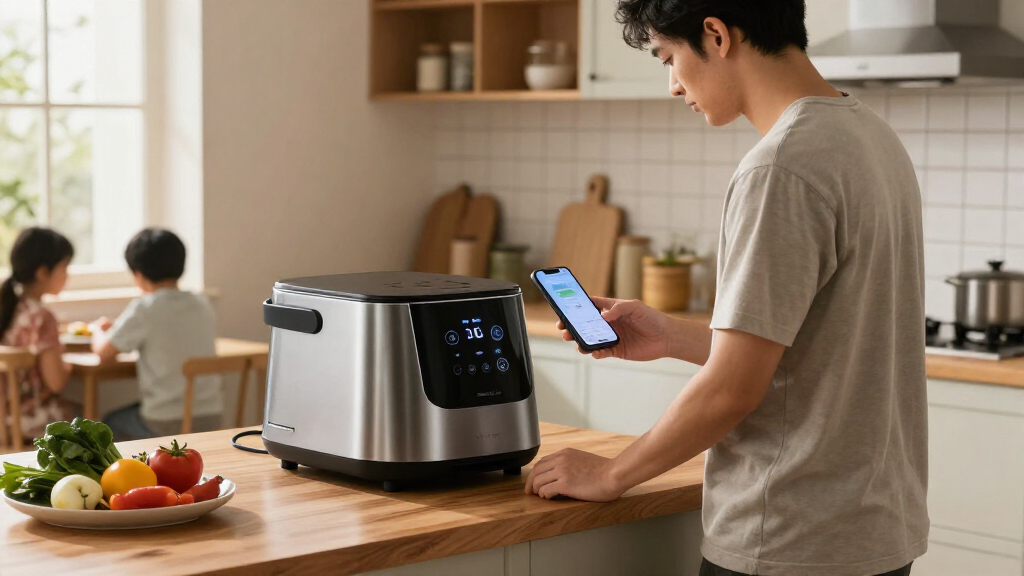
Smart kitchen gadgets are appliances or accessories that connect to an app, voice assistant, or other devices so you can monitor or control a feature. Their functions range from a simple finished-cycle alert to guided cooking programs, energy tracking, and remote settings. The word “smart” alone does not tell you which features a specific model offers.
Consider a busy Tuesday: you put a roast in the oven, help a child with homework, and hear the phone buzz when the oven reaches its set temperature. That alert can save a trip to the kitchen. A connected thermometer can also show the roast’s internal temperature, while a leak sensor under the sink can send an alert if water begins pooling on the cabinet floor.
Some gadgets can automate repeat jobs. A compatible device may start a routine when you give a voice command, or an appliance may send maintenance reminders through its app. These features can help people monitor cooking, but an alert is only as useful as the sensor, connection, and attention behind it. A notification that arrives late is no substitute for checking food or stopping a spill.
Start with the nuisance you want to fix. If you often forget when the kettle or toaster cycle ends, a suitable monitoring device may help; if you keep overcooking chicken, a probe may be a better fit. The benefit comes from solving that recurring problem, not from adding a screen to every appliance.
Products Worth Considering

Instant Pot Pro 8-Quart 10-in-1 Electric Pressure Cooker, Black

Vitamix 5200 Professional-Grade Blender, 64 oz. Container, Black

Le Creuset Enameled Cast Iron Rectangular Roaster, 5.25 qt, Riviera
As an affiliate, we earn on qualifying purchases.
Four small gadgets that can make busy cooking easier
Small connected gadgets are often the easiest place to start because they can add monitoring without replacing a major appliance. A kitchen scale, cooking thermometer, leak sensor, or suitable smart plug may cost less than a new oven and address a specific annoyance. Choose according to the task you repeat, not a gadget’s feature count.
- Connected thermometer: Follow a roast’s internal temperature in its app instead of opening the oven every few minutes. Use safe cooking guidance and check doneness appropriately; the app does not make that decision for you.
- Leak sensor: Place one near a dishwasher, refrigerator water line, or under-sink plumbing. A loud alert or phone notification can give you a head start when a slow drip turns into a wet cabinet.
- Smart scale: Use one for repeatable baking measurements, especially if a recipe gives flour by weight. You can tare the bowl and keep sticky honey off the counter.
- Smart plug: Use it only for a device the plug’s maker rates and approves. Check both manufacturers’ instructions and the power rating, particularly for equipment that creates heat or draws substantial power.
Say your Sunday sourdough recipe calls for 500 grams of flour. A connected scale can show that number clearly while your hands are dusted white, and a thermometer can help track a long roast without repeated oven-door checks. A leak sensor offers a different kind of help: it watches quietly when you are asleep or away from the kitchen.
One well-chosen gadget can be more useful than a shelf full of connected novelty tools. Think about what you already do every week, then buy a device that makes that job safer, clearer, or less fiddly.
Check these details before buying a connected appliance
Compatibility depends on the exact device and feature, so confirm that the model supports the control you want in the app or platform you already use. A product may connect to Alexa, Google Home, Apple Home, or a maker’s app without offering every setting through each one. A platform badge is a starting point, not a promise that every button will appear.
| Check | What to ask | Why it matters |
|---|---|---|
| Platform support | Does this exact model support the specific feature in my home app? | A timer may work by voice even when remote temperature control does not. |
| Internet outage | What functions still work without Wi-Fi or cloud access? | Manual controls may remain available while alerts and remote access stop. |
| App and account | Do I need an account, a subscription, or particular permissions? | Access requirements can add cost and affect how you use the device. |
| Updates and repair | How long are security updates expected, and can the product be repaired? | A device may outlast the app support you depend on. |
Imagine buying a smart oven because you want to preheat it from work. The appliance might appear in your home app, but the manufacturer may require an extra account, a particular setup, or a setting that enables remote operation. Check the manual and product support pages for the exact model before you count that convenience in your budget.
Connectivity also adds dependencies: power, Wi-Fi, software, and sometimes a cloud service. Ask what happens on the day your router restarts during dinner. If the oven still has ordinary controls and the thermometer still displays a reading, the setup has a useful fallback; if an essential task depends on an app, think carefully about that tradeoff.
Use remote cooking features without taking safety shortcuts
Remote control does not replace supervision or food-safety checks. Use an oven or other appliance remotely only when its manufacturer explicitly supports that operation, and follow the setup and use instructions. Notifications can help you monitor a task, but they cannot guarantee that food has reached a safe temperature or that an appliance is behaving as expected.
For example, a connected probe can tell you that the center of a roast is warming, and an app may alert you when it reaches your chosen target. You still need to follow appropriate safe-cooking guidance and verify results as needed. A phone alert can arrive while you are driving, underground, or in a room with poor reception; do not plan a safety-critical meal around one notification.
Be especially cautious with smart plugs. They provide basic power control, not the appliance’s internal safety logic, and they do not make every device suitable for remote switching. A high-power or heat-producing appliance should only be used with a plug rated and approved for that purpose, following both manufacturers’ instructions. If the instructions do not clearly approve the combination, do not use that plug for the appliance.
Connected devices also need ordinary household precautions. Keep cords and sensors away from hot burners and wet work areas, and install leak sensors where their maker recommends. For electrical, gas, structural, or roof work tied to a kitchen upgrade, use a licensed professional and follow applicable permits and safety steps; switch off power and use suitable PPE when directed. Smart features do not waive local code requirements.
Protect your privacy and keep gadgets useful over time
Connected kitchen products can collect usage data, and some rely on accounts, app permissions, or cloud services. Before buying, read the maker’s privacy information, check its update practices and account-security options, and find out whether you can remove your device and account data. A glossy screen tells you little about how long the product will receive support.
For instance, a refrigerator app may record when you open the door or send a maintenance alert. That information might be useful if it helps you spot a problem, but you should know what the maker collects and which features require it. Use a strong, unique account password and available sign-in protections, and limit permissions that do not support a feature you actually use.
Longevity matters because an app can change, a cloud service can end, or a software update can alter a feature. Check the warranty, repair options, stated software-support period, and whether basic controls remain available offline. A connected thermometer that still shows a reading without remote access may age more gracefully than an appliance whose everyday controls depend on a phone account.
There are tradeoffs. Alerts can save you a walk to the kitchen, but they add notification noise; automation can simplify a routine, but a cloud outage can interrupt it. Choose gadgets that work well in their basic mode and treat app features as extra help. That way, dinner does not grind to a halt because a login screen appears when the pasta water is boiling.
Build a smart home kitchen one useful problem at a time
A practical smart kitchen grows one recurring task at a time: identify an annoyance, check the exact feature, test its fallback, then keep only what proves helpful. This approach lets you see whether a device earns its cost before adding more apps and alerts. It also helps you avoid buying three gadgets that all solve the same small problem.
- Name the problem: Write down what keeps happening. “I forget the oven preheat” is specific; “I want a smarter kitchen” is too broad to guide a purchase.
- Pick a low-friction device: A thermometer may fit frequent roasting, while a leak sensor may suit a sink cabinet or dishwasher connection. Match the product to the place and routine you want to improve.
- Verify the exact feature: Confirm your phone, home platform, Wi-Fi, account, and any subscription requirements. Ask whether the control you need works through your preferred app or voice assistant.
- Check the fallback and safety instructions: Learn what keeps working offline and what the maker permits for remote use. Do not assume a smart plug can safely switch an appliance.
- Try it during an ordinary week: Notice whether its alerts arrive on time and whether they reduce effort. Keep it if you use it; adjust or remove it if it becomes notification clutter.
Suppose you often find a puddle under the sink after a busy evening of cooking. A leak sensor is a direct test: put it near the likely drip point, set up its alert, then check whether that message reaches you where you usually are. If you rarely roast food, a connected meat probe may not deserve the same priority, even if its display looks impressive.
Small additions can connect appliances, or other devices, into a broader smart home kitchen. Start with a real job and one gadget; then let your habits, reliability, and budget tell you whether to expand.
Frequently Asked Questions
What counts as a smart kitchen gadget?
A smart kitchen gadget is an appliance or accessory with connected features such as app control, alerts, automation, or integration with a home platform. A connected thermometer, leak sensor, smart scale, oven, or refrigerator can all fit the category. Check the product details: the label does not guarantee a particular feature.
Which smart kitchen gadget should I buy first?
Start with the problem you face most often. A connected thermometer can help you monitor a roast, while a leak sensor can alert you to water near a dishwasher or sink. If you do not have a recurring problem that a gadget solves, you may not need one yet.
Do smart kitchen gadgets work without Wi-Fi?
Some retain manual controls or local displays, while remote access, cloud features, and phone notifications may stop during an outage. The behavior varies by model, so check its offline functions before buying. If a basic cooking task depends on internet access, factor that into your decision.
Will smart kitchen gadgets work with Alexa, Google Home, or Apple Home?
It depends on the exact product, platform, and feature. A device may connect to a platform while exposing only some controls there; for example, a timer may work by voice while a temperature setting remains in the manufacturer’s app. Verify the model and desired control before you buy.
Can a smart plug make any kitchen appliance smart?
No. A smart plug can provide basic power control for a compatible device, but it cannot add the appliance’s internal features or safety controls. Check the power rating and follow both manufacturers’ instructions, especially for high-power or heat-producing equipment.
Are smart kitchen gadgets secure and private?
Security and data practices differ between manufacturers. Check the privacy policy, update support, account-security options, app permissions, and whether you can remove account data. A product with clear support information and useful manual controls is easier to rely on over time.
Conclusion
Choose the gadget that solves the kitchen problem you meet every week, then check its controls, offline behavior, safety instructions, and support before you pay extra. Start with one useful tool, such as a connected thermometer or leak sensor, and see how it performs in your actual routine.
The best connected kitchen is still a kitchen that works when the router blinks out: the soup keeps simmering, the manual controls still answer, and the most useful alert reaches you before a small drip becomes a little indoor lake.